
When did the online banking conversion taking place?
Online banking conversion took place on December 15, 2025.
Will I need to download a new app?
Yes, available for download on December 15, 2025, there is a new mobile app available to download to access your accounts.
*Please note, all users will need to login into the web version of the new online banking system for the first time before logging into the mobile app.*
How do I login to the new system for the first time?
Where do I go to login?
Once the new system is live after conversion weekend, the new login will be available on our website www.flatirons.bank, similar to the current login. (The homepage will be updated at 8am on 12/15/25 with the new login module.) The app version of the new online banking system will be available for login once you've gone through the web-version enrollment.
Multi-Factor Authentication (MFA)
All clients are required to use Multi-Factor Authentication (MFA) to access their online banking accounts. The MFA methods change for clients with just personal banking accounts and those with business banking.
For most personal banking clients, we encourage you to use text MFA. (See below FAQ link for details on how to set that up.)
Business banking clients will also need to use MFA for their online banking access and call the bank to finalize their setup. (See below Business Account Information section for more business MFA details.)
Why Banks Use MFA:
Banks use multi-factor authentication (MFA) to add an essential layer of protection to online accounts, helping prevent unauthorized access even if login credentials are compromised. It significantly reduces the risk of fraud and cyberattacks by requiring users to verify their identity with something beyond just a password.
Why Clients Are Required To Use It:
Clients need to use MFA to better secure their sensitive financial data and protect their assets from identity theft or fraud. It’s a quick step that offers powerful peace of mind every time they access their accounts.
How do I set up text MFA (Personal Banking)
Here is a step-by-step guide to setting up text MFA, which is more secure than email MFA:
- First you'll need to add your mobile phone number to your profile. Click on your name in the top right corner to see the menu options.
- Click on 'Contact Information' to add/update your mobile number.
- Scroll down and input your mobile number here and click 'Save' at the bottom of the page.
- Next, click on the 'Services & Settings' menu option at the top of the page.
- Click on 'Security Code Delivery' to set up MFA.
- You'll need to enroll to receive text alerts first. Click the hyperlink highlighted below to set that up.
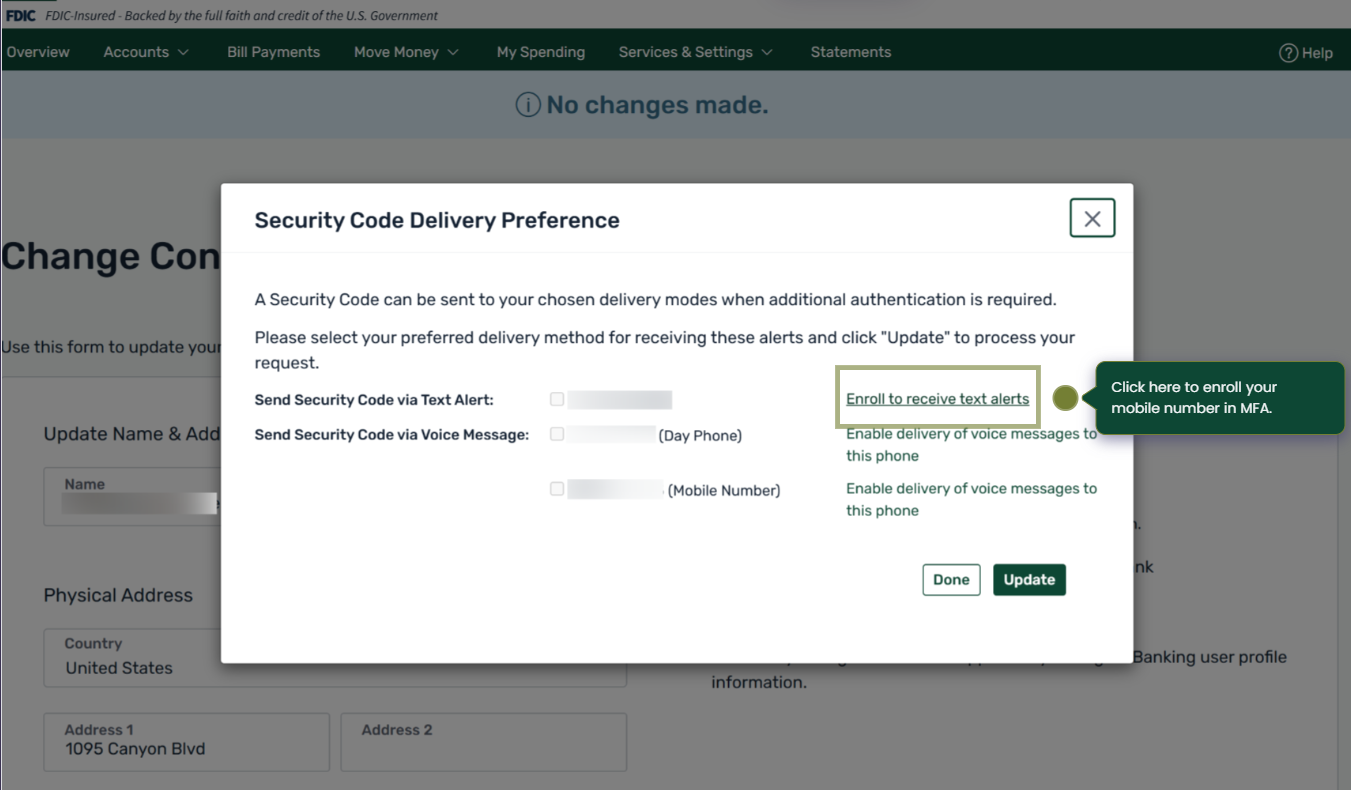
- Select the checkbox on the next screen to agree with the terms listed, and click continue.
- You'll receive a registration code via text message on your mobile device, enter that code on the next screen when prompted.
- You'll receive a confirmation page that "Your mobile phone number has been successfully enrolled to receive text alerts from Flatirons Bank".